Showing posts with label smartphone. Show all posts

Saturday, March 16, 2013

From Hongkong Comes " katadigital.com" feature


Mulai pertengahan tahun lalu, Android merajai pasar telepon seluler (ponsel) cerdas alias smartphone, di Indonesia, yang telah menggeser posisi BlackBerry. bukti ini dipaparkan oleh lembaga riset bisnis International Data Corporation (IDC) Indonesia  pada akhir November 2012.

Menurut IDC, ponsel berbasis Android memiliki kontribusi sebesar 64 persen dari seluruh ponsel pintar yang dikirimkan ke Indonesia pada kuartal ketiga 2012. Angka ini bertumbuh dari kuartal kedua sebanyak 52 persen. Dari pertumbuhan angka tersebut, IDC yakin bahwa Android akan mempertahankan dominasinya pada tahun ini, meninggalkan sistem operasi lainnya macam iOS milik Apple, BlackBerry (BB), maupun Windows keluaran Microsoft.

Tren pertumbuhan Android di Indonesia itu sejalan dengan kepopuleran sistem operasi tersebut di dunia. Di Amerika Serikat, Android menggeser iOS, yang lebih dulu menyingkirkan BB. Di Eropa juga begitu, apalagi di banyak negara berkembang. Padahal, Android boleh dikata lahir belakangan ketimbang BB dan iOS. Hanya dalam waktu sekitar tiga tahun, Android menggeser para pendahulunya itu.

Bagaimana wabah Android itu bisa sedemikian fenomenal?

Jawaban yang paling masuk akal adalah bahwa Google, si pembuat Android, mengambil posisi bisnis yang berbeda total dengan dua dua pendahulunya tersebut. Google menggunakan pendekatan free (bebas), dan open (terbuka) bagi Android, bertolak belakang dengan Apple dan BB yang tertutup (closed).

Pendekatan yang dilakukan Google itu berarti bahwa Android yang dia buat boleh dipakai oleh vendor atau pabrikan ponsel manapun tanpa perlu bayar kepada Google. Dan setiap vendor ponsel pun diberi kebebasan untuk mengembangkan (open) Android guna disesuaikan dengan kekhasannya (kostumasi).

Lain hal dengan Apple dan RIM, yang tidak melepas sistem operasinya kepada vendor lain. Sistem operasi buatan masing-masing hanya digunakan untuk merek ponselnya sendiri.

Dengan pendekatan bisnis macam itu, Android menjadi  lebih gampang menyebar ke segala penjuru dengan cepat.  Karena,  bisa dikata semua vendor ponsel, dari yang sudah punya nama di level internasional sampai lokal, bebas menggunakan Android.

Maka, memang menjadi wajar ketika sejak tahun lalu Android diusung oleh banyak vendor ponsel menyerbu Tanah Air. Pemain papan atas Samsung datang dengan aneka jenis ponsel Android dengan rentang harga yang cukup bervariatif. LG, Sony, HTC pun begitu.

Bahkan vendor lokal juga tak mau kalah berebut kue. Ada Nexian, IMO, Mito. Zyrex yang dikenal sebagai vendor komputer pun ikutan meramaikan pasar Android, juga Polytron yang dikenal sebagai produsen perangkat elektronik rumah tangga. Belum lagi vendor dari China macam ZTE, dan Huawei, juga datang.

Karena begitu banyak vendor menjajakan Android, otomatis pula jadilah banyak sekali produk ponsel Android yang beredar, dengan rentang harga di bawah Rp 1 juta hingga Rp 7 jutaan.Pendatang baru pun tak mau membiarkan begitu saja pasar ponsel cerdas di Indonesia yang masih berpeluang besar untuk membengkak. Dari Hongkong datang KataDigital (katadigital.com), yang melansir satu produk bernama  “Kata i1” (baca: kata ai wan).

Ponsel buatan Kata ini berbalut hitam (depan), dan punggung putih. Berdasarkan spesifikasi produknya, ponsel hitam-putih ini masuk kategori  mumpuni, meski bukan hi-end, untuk aktivitas berponsel cerdas-ria (selain untuk bertelepon, dan SMS, juga untuk browsing, imil, hiburan, dan chatting multi-media).Untuk bermain game berat, apalagi game enteng macam Angry Bird, Kata i1 bisa berjalan mulus. Juga untuk multi-tasking, tak masalah. Kemampuan ini karena ditopang oleh prosesor dual core 1,2 GHz, plus RAM DDR3 sebesar 1 GB. Jumlah RAM sebesar ini jarang dipunyai oleh ponsel sekelasnya, yang kebanyakan hanya menyediakan 512 MB.

Dimensi layarnya yang lapang (4,5 inci diagonal), serta teknologi IPS-nya, membuat ponsel ini pas untuk aneka keperluan telefoni sampai hiburan. Kecerahan layarnya tidak membuat mata lelah, karena mampu menampilkan teks secara tajam, dan warna yang alami. Layar sentuhnya pun responsif.

Ukuran bodinya tergolong enak digunakan dengan satu tangan, alias tidak kekecilan ataupun kegedeaan. Dimasukkan ke dalam kantung baju pun bisa, dan tidak begitu menonjol, juga bisa dimasukkan di kantung belakang celana.Telepon genggam cerdas yang dilepas ke pasar seharga sekitar Rp 2 juta tersebut menggusung dual-SIM GSM yang aktif secara bersamaan. Salah satu kartu digunakan untuk akses data, meski juga bisa untuk fungsi telefoni.

Untuk berlama-lama ngobrol dengan orang di seberang sono, si hitam-putih ini tidak bikin kuping panas. Tingkat volume bisa disesuaikan, pun speakerphone bisa dimanfaatkan. Daya tahan baterenya pun lumayan lama. Jika digunakan untuk bertelepon dan berinternet dalam tingkat moderat, daya batere bisa bertahan seharian.   Dengan bandrol harga segitu, Kata i1 rasanya cukup kompetitif, mengingat kemampuan aneka komponen yang diusung di atas rata-rata ponsel sekelasnya.

Spesifikasi singkat Kata i1:

Dual GSM; layar: IPS, 4,5 inci, qHD (960x540); prosesor: dual core 1,2 GHz; kamera: belakang  8 MP (auto focus) plus lampu kilat LED, depan 1,3 MP; memori: internal 4 GB, mendukung tambahan micro SD maksimal 32 GB, RAM 1 GB; Android 4.04 (Ice Cream Sandwich); koneksi: bluetooth, 3G HSDPA, Wifi, tethering (menjadi hotspot), GPS; batere: 1.600 mAh; proximity sensor;  Aneka aplikasi hiburan; dan Radio FM.

Data Speed : Test Your Smartphone Now

So you've read about our 4G speed tests, and now you want to know how your smartphone or cellular-modem speeds stack up to our results. You have a few easy ways to conduct such tests yourself.

A Disclaimer


Mobile speed tests
Testing network speeds is a messy business. To measure your Internet connection's throughput, these apps will test the transfer rates between your smartphone or PC and the closest test server available. However, the test data will make several stops between your device and the test server--which means network congestion or signal interference will have plenty of opportunity to slow down your overall connection. If you're trying to compare different devices on the same carrier, or speeds between different carriers, you'll get more accurate results if you try several tests in the same time and place, and keep track of the different speeds. Don't base your results on a single test--everyone has a bad network day every now and then.

Speedtest.net: Android, iOS, and Your PC


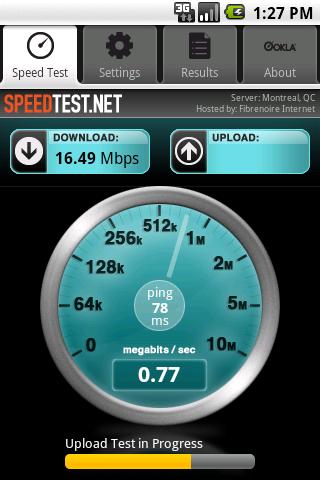
If you don't already use Speedtest.net, you should--it's an easy way to test your home or office's Internet connection for bandwidth and latency. Of course, you can also use this service to test your PC's cellular Internet connection (either via built-in cellular Internet or a separate modem, such as the MiFi). All you have to do is navigate over to Speedtest.net and click the Begin Test button, and the site will match you up to the nearest test server and put your Internet connection through its paces, which is handy for checking to see if your ISP's reported speeds match your actual speeds.

Speedtest.net's testing Web app relies on Flash, so it might not work quite as well on your smartphone browser. Fortunately, if you have an Android or iOS gadget, you can grab the appropriate free Speedtest.net app and try it yourself. Some users have reported problems with the app's automatically assigning a test server located on the other side of the world--when we tried the Android app, it thought we were in Kansas instead of California. If the same kind of thing happens to you, open the Settings menu and manually choose the closest server possible. The farther away the test server is, the more network hops your data has to make to get there, which means that you'll see slower speeds and lower pings that aren't necessarily reflective of your actual network speed.

Bandwidth Testing for BlackBerry and Windows Phone 7

Not on an Android or iOS smartphone? Don't worry, you still have speed-testing options. BlackBerry users can try the Cisco Global Internet Speed Test (GIST) app, though judging from the comments in the AppWorld listing more than a few people have had problems with its either using a test server that is too far away or simply refusing to work altogether. Still, it's worth a shot.
Windows Phone 7 users, on the other hand, should grab BandWidth, a quick-and-dirty testing app. It's listed in the Marketplace simply as "BandWidth," but you can read a bit more about it in this XDA Developers thread.

4G Wireless Speed Test : Which Companies Can Reliably Provide Next-Generation Speed ?

By now you've seen all the ads pitching wireless companies' new 4G mobile broadband services and devices. But beyond all the buzzwords and hype, which companies can reliably provide next-generation speed?

We decided to find out by testing each of the four major national carriers--AT&T, Sprint, T-Mobile, and Verizon--in 260 locations spread among 13 U.S. cities. We found some clear winners and losers, and some good news about wireless service in the United States as a whole. Here are our conclusions.

Wireless data speeds have soared: Since this time last year, the major wireless carriers, as a group, have increased their average download speeds for laptop-modem users by more than threefold, an apparent result of their urgent transition from 3G to 4G network technology.

(We measured the best service we could get--3G or 4G--in each testing location.) Over laptop modems, the Big Four carriers now have a collective average download speed of roughly 3.5 megabits per second in our 13 testing cities, versus a nearly 1-mbps average download speed in those cities at the beginning of 2010, a remarkable improvement.

In our previous wireless-network performance studies, we measured the "reliability" of the data service, expressed as the percentage of tests in which we could obtain a good connection. But our test results show that network service has improved to the point where it's rare to find an unusable signal or no signal at all. So we have retired our reliability measurement--another testament to the dramatic improvements of the past year.


4G Winners and Losers: Laptop-Modem Tests

Verizon's 4G LTE is for real: Verizon's 4G LTE service, which is now in 38 U.S. markets, was widely available in 12 of our 13 testing cities. (We didn't go out of our way to test in areas served by Verizon's LTE network; we haven't changed our list of testing cities in the three years we've done these tests.) Our laptop-modem tests on Verizon clocked speeds that were far faster than those on competing 4G networks in the same tests (twice as fast as the second-fastest service, in fact). Verizon's network had an average download speed of roughly 6.5 mbps and an average upload speed of 5.0 mbps.

One important caveat: A relatively small number of Verizon customers currently use this new network. During our testing period, Verizon offered only two laptop-modem models that worked on the network, and none of the company's smartphones could take advantage of the new 4G speeds. The performance of Verizon's network could degrade as more people--and devices--connect to it.

And there's a downside to Verizon's 4G success. While the new 4G LTE network is lightning-fast, our smartphone-based tests suggest that the 3G CDMA network that most Verizon smartphone customers use today may actually be getting slower. The connection speeds we measured on our Verizon (3G CDMA) testing smartphone (a Motorola Droid 2) stayed the same or decreased in 10 of our testing cities since last year. And at the moment, those CDMA phones are all that's available to Verizon Wireless customers.

T-Mobile smartphones are fastest: Verizon may have the fastest network for laptops, but in our tests T-Mobile had the speediest results for smartphones. The T-Mobile HTC G2 we used for testing produced a 13-city average download speed of almost 2.3 mbps; that's about 52 percent faster than the second-fastest phone, Sprint's HTC EVO 4G, which had an average download speed of 1.5 mbps.

T-Mobile also impressed in our laptop-modem tests. Although only half as fast as Verizon's, T-Mobile's download speeds averaged almost 3 mbps in our tests--more than a threefold increase from the carrier's nearly 0.9-mbps average download speed in our January 2010 survey. With these laptop- and smartphone-based results, T-Mobile is proving to be a worthy challenger to its much-larger competitors.


4G Winners and Losers: Smartphone Tests

AT&T continues to grow, but perhaps not fast enough: AT&T, the big winner in our January 2010 survey, has continued to ramp up throughput speeds at about the same pace, judging from this year's survey results. Its average download speeds in our laptop-modem tests grew 76 percent to a roughly 2.5 mbps average this year. But each of its competitors showed bigger jumps in download speeds over the past year, resulting in a third-place finish for AT&T in this year's speed results.

And AT&T's speed gains didn't translate well to our smartphone-based tests: The average download speeds we measured on our Apple iPhone 4 (1.4 mbps) increased only 15 percent over the speeds we measured on the same device in early 2010. However, AT&T intends to launch its own 4G LTE network later this year, a move that might tip the balance of the 4G speed race in its favor once again.

Sprint needs more 4G: In the cities where Sprint offers its 4G WiMax service, customers saw large speed increases over the past year. Sprint's average download speeds grew 170 percent to 2.1 mbps in our tests this year; the result would have been even better had the WiMax service been more consistently available throughout our test locations. But in cities such as New Orleans, Phoenix, and San Diego, where Sprint still relies on its 3G CDMA network for data service, download speeds have fallen, and remain well below the 1 mbps mark.

10 Steps : How To Conserve Your Smartphone Battery

Apple, BlackBerry, Samsung and other global brands have come up with smartphones equipped with powerful mobile operating systems such as Google’s Android, Nokia’s Symbian, Apple’s iOS, etc, that allows users to play games, listen to mp3s, snap pictures, have access to the Net and even stream videos.
Given their diverse range of capabilities and multi-functionality running on a mobile (as in on-the-go) platform, it’s no wonder that battery life has always been a concern for developers, manufacturers and the users themselves. On average, most smartphone batteries last between one and two days before being completely depleted, and in need of a recharge.
Increase Battery Life

(Image Source: Dokisoft)
While we wait for the hardware development to catch up, the alternative will be to conserve battery life. As it is with our energy levels, battery life can be effectively utilized and managed, leaving nothing to go to waste. Without a battery charger or a spare battery with you everywhere you go, you’ll have to make due with minimizing the consumption of battery juice.
Here are 10 essential tips how you can conserve your smartphone’s battery.

1. Turn Off Vibrations

Vibrations are great for notifying you about incoming calls or messages when you’re in the theatre, meetings or other places where it’s necessary to keep the phone silent. In places where it doesn’t matter, it will be better for you to use your ringtone as notification if you want to keep your smartphones on longer.
Vibrations actually use up more power than ringtones. The sounds produced by ringtones are just very tiny vibrations in your smartphone’s speaker. Compare that to the shaking of the entire phone via vibrating a smart weight, playing a ringtone definitely zaps less of your battery. The same applies for using vibration for tactile feedback. If you don’t think it’s necessary, then disable vibrations or at the very least, lessen the magnitude of the vibrations.

2. Dim Your Screen

This one tip affects battery life drastically. It’s obvious that dimming your screen will reduce your smartphone’s power consumption since we all have to activate the screen whenever we use our phones. If our screen is brightly lit up every couple of minutes when we check our emails and such, it eventually will zap battery juice. Auto-brightness setting enable the smartphone to adjust the brightness to its optimal level for reading while conserving battery life.
On the other hand though, you may consider tuning the level permanently to the dimmest level that you can still read under without straining your eyes. Doing so may do wonders to your battery life in the long run.

3. Shorten Screen Timeout

In the same manner, if you wish to minimize the power consumption of your smartphone of the screen display, you ought to consider shortening the screen timeout. This decides how long the screen will remain lit after you finish interacting with it.
Some of us do not have the habit of ‘locking’ the phone after we we are done with it; we just let it go lights out by itself. Keeping the timeout duration short will ensure that the phone doesn’t waste power when you’re not using it.

4. Switching Off When Inactive

Although it is true that turning on your phone consumes more power than unlocking your phone, switching it off for a couple of hours can save more battery than leaving it on sleep or inactive mode. If you know you’re not going to touch your phone for an extended period of time, such as when you’re attending a meeting or sleeping, you can actually cut down a significant amount of energy consumption if you simply switch it off.
You might be wondering why you should even bother about battery level when you’ve a charger with you at home while you sleep. Well, the thing is that repeated charging for certain kind of batteries eats up the battery volume. For such batteries, the best way is to conserve as much as you can so that your battery retains its original capacity as much as possible.

5. Charge Your Battery Correctly

Speaking of phone charging, there are generally two kinds of rechargeable batteries commonly used for smartphones: Lithium-ion (Li-Ion), and Nickel-based batteries: namely Nickel-Metal Hydride (NiMH) and Nickel-Cadmium (NiCd).
The battery capacity in NiCd batteries are reduced every time you recharge them. Nonetheless, NiCd batteries have longer life cycles i.e. they can be recharged more often than NiMH batteries before stop working. Nickel-based batteries should be charged (to the full amount) when they’re more or less out of power, and not when there’s still a good amount of energy left.


(Image Source: Slairea)
Li-Ion batteries have the longest life cycle among the three types of batteries but they also need to be charged more frequently (even when the battery is not fully used up) to maintain its original capacity. To keep your battery lasting longer, find out more about the type of battery that your smartphone uses and maintain the appropriate charging strategy for optimum usage.

6. Close Unnecessary Apps

Some of us open app after app and don’t bother to close them even after we no longer need to use them. This multi-tasking capability is a common feature of smartphones, but it is also a main reason why battery life gets drained away easily. The worst thing is that you’re losing battery juice when you are not even using them. Leaving them open will leave your battery at half-bar in no time.
As often as possible, kill your apps if you are not using them. There are some valuable apps out there that manage the multitasking ability of your smartphone to ensure it performs at its best to conserve battery life without jeopardizing usage. One such Android app is the Advanced Task Killer.

7. Disable GPS

Certain apps eat up more battery juice than others, particularly apps which utilize the GPS system to track your location. Your smartphone has a GPS unit that allows the sending and receiving of signals to and from satellites to determine your exact location, which is integral for some apps to work, for example, map-based apps like Google Maps or to check-in on Facebook.


(Image Source: Fotolia)
When left running in the background, some of these apps may continue to send and receive signals. It takes a lot out of your battery to continuously do that, even if you aren’t aware of it. Hence, you should ensure that those particular apps are closed when you really don’t need them. A more extreme way is to disable location services when prompted by these apps. It may slow down the efficiency of these apps but you won’t be tracked on your location and some users deliberately do that for privacy reasons.

8. No Bluetooth, Wi-Fi, 3G/4G When Not in Use

Energy is consumed whenever your smartphone searches for signals, Wi-Fi, 3G or Bluetooth etc. When the reception is poor, the phone will continue scanning to attain a good connection. Repeated searches for these signals can easily make your battery level drop a notch.
What I’m saying is that you should turn off your Wi-Fi or Bluetooth when you don’t need to be connected. One convenient way to do it is to switch to ‘Airplane Mode’ or just switch your phone off when you know you can’t get any signal.
On the other hand, when you need good reception for your smartphone, place or position your phone in high connectivity zones. This will prevent your smartphones from constantly seeking for a connection and wasting your precious battery power switching from one signal to the other.

9. Minimize Notifications

With constant connectivity to the Internet, we tend to get notifications on our smartphones all the time, be it updates on the latest news, emails, high scores from games, add-ons for apps etc. But I’m sure that you would only want to be notified on the more essential stuffs like new text messages, or messages from Whatsapp.


(Image Source: Taakoses)
Not only is it annoying to constantly receive irrelevant notifications that can actually wait, it is also a powersucker for each of these notifications. Every incoming notification will light up your screen, make a sound alert or vibrate.
Manage your settings well and disable unnecessary notifications to save a little battery power (and avoid being frustrated with these constant notifications).

10. Maintain Cool Temperature

Some of us might have observed that our battery runs out faster when our smartphones are warm. Put simply, don’t leave your smartphones under direct sunlight or in any place that is hot.
One of the more common occurrences would be leaving the smartphone in a car parked under the sun. The battery will function optimally in cooler environments, so do look out for, and try to avoid, scenarios where your phone is exposed to unnecessary and excessive heat.

AB Smartphone Kata i1 Specification In Google Page


Size: 132 x 67 x 10.25mm (dimension)
Weight: 148g
Size: 4.5-inch
1.2 GHz Dual-Core MT6577 Processor
Android 4.0.4 (Ice Cream Sandwich)
8.0MP autofocus camera with LED Flash
720p HD video recording
1.3MP front camera
1GB of RAM
4GB of internal storage
microSD up to 32GB
8.0MP autofocus camera with LED Flash
720p HD video recording
1.3MP front camera
FM Radio
Wi-Fi 802.11 b/g/n
Dual SIM Dual Standby
Standby/ Call time: 500 hours/  5 hours
Available color: Black and White

Rp. 1.900.000

Friday, March 15, 2013

Garansi : Kata I1 4.5" HD Video Confrencing


With 1.3 MP front camera & 4.5"  Display you can now enjoy the highest quality video conference experience , bringing family & friends closer together.

8.0 MP photo taking experience

8.0 MP back & 1.3 MP front camera allowsyou to capture and share precious moments with your family or friends arround the world.

1.2 Ghz Dual Core Game Play

Kata i1 is delivering ultimate performance to the next level, Kata i1 provides faster browsing. Quicker multi tasking & smoother gaming experience.

Jakarta, Bali, Semarang, Yogyakarta


Friday, February 22, 2013

Jual Android Pintar ( Smartphone ) Kata i1 Harga Ekonomis

Price: Rp. 1.850.000 
( Garansi replace 1 tahun )

AB Group Technology
Jl.Urip Sumoharjo No.127
Supermarket Giant Lt.II
D.I.Yogyakarta - 55221
Phone : ( 0274 ) 6635 098

KATA i1 Specifications :

Dual SIM / Dual Standby
4.5-inch qHD (960x540) IPS display (245ppi)
with 5-point multi-touch feature
1.2 GHz Dual-Core MT6577 Processor
Android 4.0.4 (Ice Cream Sandwich)
PowerVR SGX531 GPU
1GB of RAM
4GB of internal storage
microSD up to 32GB
8.0MP autofocus camera with LED Flash
720p HD video recording
1.3MP front camera
FM Radio
Wi-Fi 802.11 b/g/n
Bluetooth v2.1 + EDR
GPS with A-GPS support
Quad-Band GSM 850/900/1800/1900MHz
Tri-Band 3G WCDMA 900/1900/2100MHz
microUSB 2.0 / 3.5mm headset jack
Gravity Sensor, Proximity Sensor, Light Sensor
Li-ion 1600mAh battery (removable)
Talk time up 5 hours
Standby time up 500 hours
132 x 67 x 10.25mm (dimension)
148g (weight)
Color: Black and White

Blogger States Google Headline Animator